
If you want to support independent women's media, become a Mamamia subscriber . Get an all-access pass to everything we make, including exclusive podcasts, articles, videos and our exercise app, MOVE.
We've all been the kind of person subscription services love.
Forever signing up for free trials, convinced we'll remember to cancel them, only to end up with bills on bills for months.
When I began tracking my money ahead of buying a house, I was shocked by how much these passive expenses added up to.
Prime, Spotify, Binge. And let's not even talk about the cost of Apple storage???
I spent far too long trying to figure out what the 17 identical-looking "Apple.com/bill" charges belonged to.
Watch: BIZ asks how much money is too much money to give for a work gift? Post continues below.

I realised there was $100 coming out of my bank account every month and I definitely wasn't getting that value back.
So, I decided to find the easiest method to remove these random expenses from my account.
The life admin of going through my bank account seemed a little too much, so I went online and found an easier option.
Most of my subscriptions had been signed up to on my phone.
And guess what?
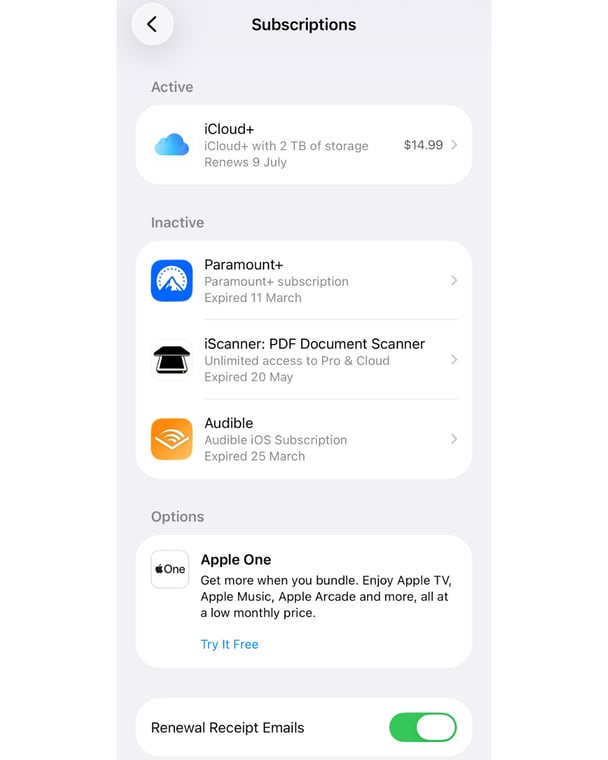
Apple actually has a little subscriptions management section of the iPhone where you can easily see what you're signed up to, and how much it costs, across all your apps and services.
The whole thing took less than 10 minutes (and there's an Android version too!)
Here's where to find it.
Method one: through the App Store.
It's super simple.
Open the App Store and tap your profile photo in the top-right corner. Select Subscriptions and you'll see a list of everything you're currently paying for through Apple, including the cost and next billing date.
Tap any subscription to cancel it. Scroll further down and you'll also find your inactive subscriptions, which is handy if you want to restart something you used to pay for — or simply revisit some questionable decisions from years gone by.
Method two: through Settings.
Open Settings, tap your name at the top of the screen, then select Subscriptions.
Same destination, different route.
One thing to know: this only shows subscriptions you've purchased through Apple's payment system. If you signed up directly through a company's website, it won't appear here and you'll need to cancel it through that provider instead.
While you're on the subscriptions page, scroll to the bottom and switch on Renewal Receipt Emails. Every time a subscription renews, Apple will send you an email showing exactly what you've been charged for.
Trust me, it's much more useful than spotting a random $14.99 charge on your bank statement and trying to remember what it belongs to.
And if you find something that's been charging you longer than it should have, you can try requesting a refund from Apple.
You can also manage subscriptions on Android.
It's a very similar process (thank goodness!)
To manage your Android app subscriptions, open the Google Play Store, tap your Profile Icon, and select Payments & subscriptions.
Then simply tap Subscriptions to view, change, or cancel any recurring app charges.
How to get a refund on subscriptions you no longer want.

In the App Store, on the Apps tab, scroll down to Quick Links and tap Request a Refund. You'll be taken to reportaproblem.apple.com, where you can sign in, select the charge and explain the issue. Apple usually gets back to you within a day or two.
There's no guarantee it'll be approved, but if you tried to remove a subscription and it is still charging you, it's worth trying.
Tips to stop subscription creep.
Just like lifestyle creep, subscription creep is the slow, easily missed addition of subscriptions that eventually robs your wallet of all your expendable income.
Some of the tips that have worked for me include:
- Embracing a 'rotate and churn' method: Cancel streaming platforms (like Netflix, Stan, or Disney+) the moment you finish watching your must-see shows.
- Switch to annual plans: If you're using a year-round service, an annual plan might save you money.
- Check for hidden card perks: No need to sign up to a subscription service if it comes for free with your credit or banking card.
- Organise a roster: Ask some of your friends to take out subscriptions and share the logins between you.
- Instigate a 90-day audit: Every quarter review your subscriptions to make sure they're serving you, and not the other way around.
- Look at your bank's features: Banks like CommBank offer tracking tools like 'Bill Sense and the Regular Payments', which can help you keep abreast of what's really coming out of your account. (See my lineup below!)
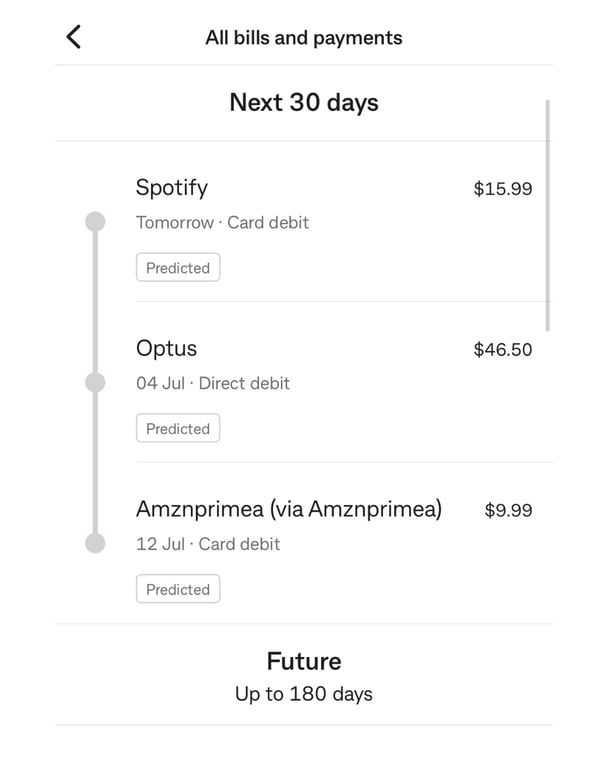
How much are subscriptions in Australia these days?
Forget how much you're even paying?
This is how much some of the most popular subscription services cost today.
- Netflix: $9.99/month with ads
- Spotify: $15.99/month
- Apple Music: $12.99/month
- Amazon Prime: $9.99/month
- Prime Video: $9.99/month
- Binge: $10/month
- Apple iCloud storage: $14.99/month for 2TB
- Kayo: $29.99 for the standard plan
If you have all these (noting Prime Video comes with a Prime subscription), you're over $100. It adds up so easily!
And now, it's time to liberate yourself from the subservience of the subscription giants. You're welcome.
Feature image: Getty.
Are you a parent?
We want to ask you a few questions about health and safety programs… Complete our quick survey for a chance to win a $1000 gift voucher in our quarterly draw!
Take survey →Cassandra Green
Acting Deputy Editor
No Comments
Be the first to leave a comment